
Froststrap
Froststrap is a powerful Roblox booster that optimizes FPS, reduces lag, and enhances gameplay. Download this free launcher with FastFlag editor, server selector & PC tweaks for low-end systems.
Are you tired of lag and low FPS while playing Roblox? Froststrap is here to help. This powerful booster tool makes your Roblox games run smoother and faster, even if you have a low-end PC.
Whether you’re dealing with stutter, slow loading times, or connection issues, this optimization launcher can fix these problems. Let’s explore how Froststrap can transform your Roblox experience.
What is Froststrap?
Froststrap roblox is a custom launcher designed to optimize Roblox performance. Think of it as a mod that upgrades how Roblox runs on your computer. It works by tweaking both game settings and your PC’s system resources to deliver higher FPS, reduce lag, and create smoother gameplay.
This tool emerged as an improvement over older solutions like Bloxstrap, Fishstrap, and Voidstrap. The main difference? Froststrap combines the best features from these previous boosters while adding new optimization tools. It’s particularly helpful for players using low-end systems or those wanting to maximize their gaming performance.
Available on GitHub as an open-source project, Froststrap continues receiving regular updates and bug fixes from its development community. Anyone can contribute to its improvement by creating an account on GitHub.
Features of Froststrap
File Cleaner Tool
Over time, Roblox creates session logs and temporary files that eat up storage space. These accumulated files can slow down your computer and cause lag during gameplay. Froststrap’s cleaner feature removes this digital clutter automatically, keeping your system running efficiently. Run this tool every few months for best results.
FastFlag (fflags) Editor for Advanced Tweaks
The FastFlag editor is where Froststrap truly shines. This feature lets you modify hidden Roblox settings that aren’t available on the standard Roblox settings page. You can adjust graphics options, disable unnecessary visual effects, and tune performance settings.
Don’t worry if you’re not technical—Froststrap includes preset configurations you can apply with one click. Advanced users can create custom flag combinations to perfectly match their computer’s CPU and GPU capabilities.
Better Control Over Roblox Settings
Unlike the basic Roblox launcher, Froststrap gives you deep access to game settings. From its interface, you can:
These PC tweaks help optimize Roblox regardless of your hardware specifications.
Region Selector for Lower Ping
Network lag ruins gaming sessions. Froststrap solves this with its server selector feature. This tool shows available Roblox servers with their ping times and uptime statistics. Simply choose the region closest to your location for the lowest possible ping and most stable connection.
The region selector updates automatically, so you always know which servers are performing best. This feature alone can dramatically improve your online gaming experience.
Discord Rich Presence Integration
Want your Discord friends to see what you’re playing? Froststrap includes Discord rich presence support. This integration automatically updates your Discord status with your current Roblox game, making it easy for friends to join you. It’s a small feature that adds great social value.
FPS Unlocker for Smoother Gaming
Roblox normally limits your frame rate, but Froststrap’s FPS unlocker removes these restrictions. You can set unlimited FPS or choose a specific cap based on your monitor’s refresh rate. Higher FPS means smoother animations and better responsiveness, especially important for competitive games where split-second reactions matter.
Fully Customizable App Themes
Personalization matters. Froststrap offers fully customizable app themes with gradient colors and custom UI layouts. Change the launcher’s appearance to match your style. The interface remains clean and easy to navigate regardless of your chosen theme.
System Optimization and PC Tweaks
For users with low-end computers, Froststrap provides essential system tweaks. These optimization settings adjust memory usage, reduce background processes, and improve graphics rendering efficiency. The result? Better performance without upgrading your hardware.
Mod Generator for UI Customization
The built-in mod generator lets you customize Roblox’s visual elements. Change cursor designs, modify the shiftlock icon, personalize emote wheels, or even replace the Roblox logo and loading spinner. Apply gradient colors with custom angles for a unique look that reflects your personality.
Download
How to Install Froststrap
Getting started with Froststrap is straightforward:
- Step 1: Download: Visit the official website to download the verified installer file. Always use the official source to ensure safety.
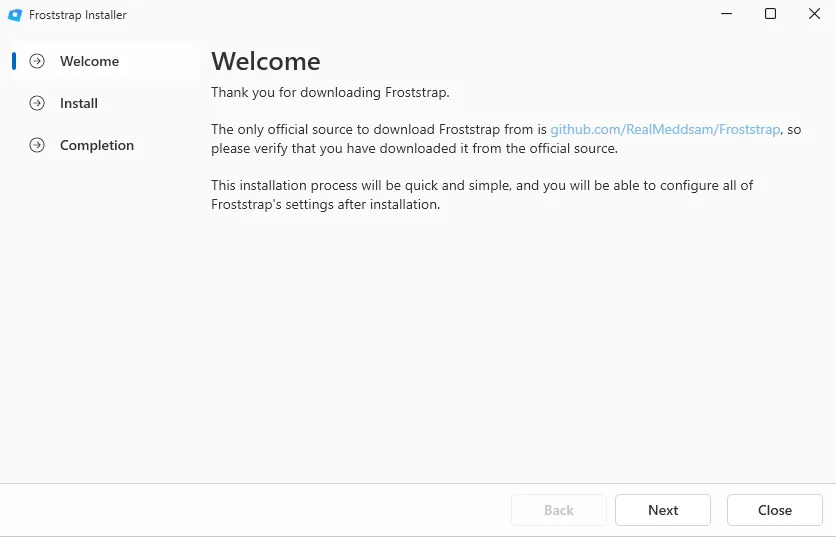
- Step 2: Locate the File: Find the downloaded installer in your PC’s Downloads folder.
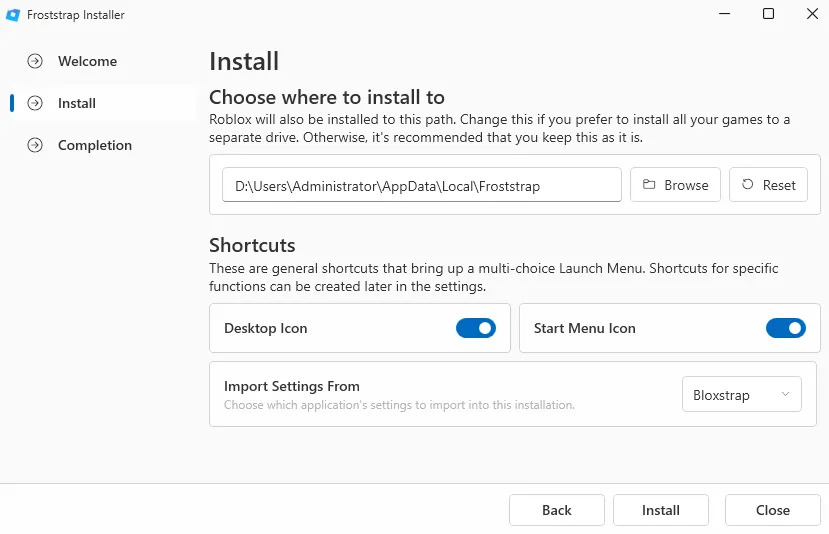
- Step 3: Run Installation: Double-click the installer file. Choose your preferred installation location or use the default folder. Click Install to begin.
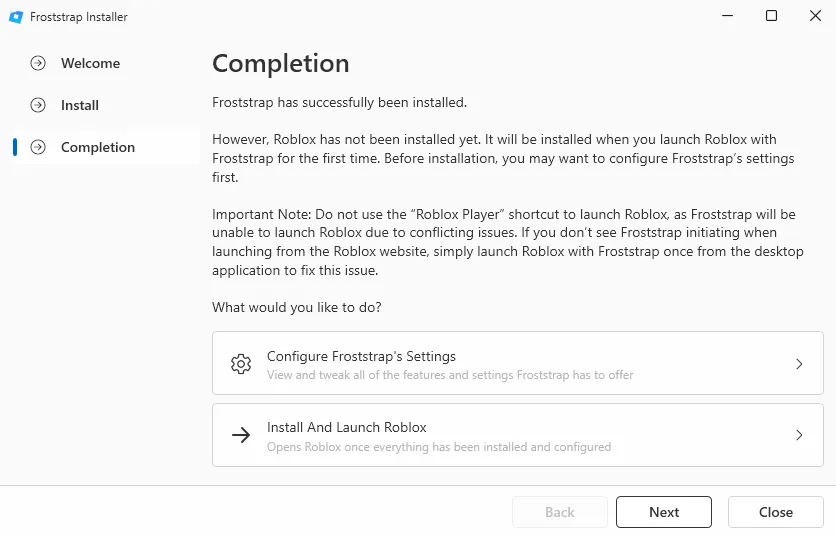
- Step 4: Configure Settings: After installation completes, launch Froststrap. Configure your optimization preferences, enable desired tweaks, and customize the UI if wanted.
- Step 5: Start Gaming: Click Save and Launch to start Roblox with your new optimized settings. Notice the immediate improvement in performance.
The entire process takes just a few minutes, and you’ll be ready to enjoy smoother Roblox gameplay right away.
Why Choose Froststrap Over Alternatives?
- Better Performance: Get higher FPS, fix lag issues, and enjoy smoother gameplay through comprehensive optimization.
- Complete Customization: From fast flags to UI mods, customize every aspect of your Roblox experience.
- Network Optimization: The region selector ensures lower ping by connecting you to the best server.
- Works on Any PC: Whether you have a gaming computer or a budget laptop, Froststrap optimizes accordingly.
- Active Development: Regular updates, bug fixes, and new features keep the tool current. The latest commit on GitHub shows ongoing improvement efforts.
- Community Support: Join the Discord community for help, share tweaks, and learn optimization tips from other users.
Froststrap vs Bloxstrap & Other Roblox Boosters
- Bloxstrap: The original booster that started it all. Still maintained but lacks advanced features like auto-updates and comprehensive optimization.
- Fishstrap: An earlier fork with strong performance tweaks but limited UI customization. No longer actively developed and considered deprecated.
- Voidstrap: A solid alternative with good optimization features. However, Froststrap offers better stability and more frequent updates.
- Froststrap: Combines the best features from all previous tools while adding unique capabilities like the mod generator, advanced FastFlag editor, and superior Discord integration. Active GitHub repository with regular releases.
Froststrap Optimization
- Start with Presets: New users should begin with preset fast flags rather than creating custom configurations. These tested settings work well for most systems.
- Run the Cleaner Regularly: Schedule the file cleaner to run monthly. This prevents performance degradation from accumulated temporary files.
- Test Server Regions: Spend time testing different server regions to find the one offering the lowest ping for your location.
- Adjust FPS Gradually: If unlocking FPS, increase it gradually while monitoring temperature and stability. Not all systems handle unlimited FPS well.
- Join the Community: Connect with other users on Discord to share tweaks, get troubleshooting help, and learn about new features.
Frequently Asked Questions (FAQs)
Is Froststrap Safe to Use?
Yes, Froststrap is completely safe when downloaded from the official source. It’s open-source software available on GitHub, meaning anyone can review its code. The tool contains no malware and doesn’t compromise your account security.
Will It Work on My Low-End PC?
Absolutely. Froststrap specifically includes optimization features for low-end systems. The PC tweaks, cleaner tool, and FastFlag editor help even modest computers run Roblox smoothly. Many users report significant improvement on budget hardware.
Can Froststrap Fix Lag Issues?
Yes, Froststrap addresses lag through multiple approaches: system optimization reduces local performance lag, the server selector minimizes network lag, and FPS unlocking eliminates frame rate limitations. Combined, these features create noticeably smoother gameplay.
How Much Customization Is Available?
Extensive customization is Froststrap’s strength. You can modify visual elements through the mod generator, adjust performance via fast flags, personalize the launcher with custom themes, and fine-tune every setting from the Roblox settings page integration.
Where Do I Get Updates?
Froststrap includes an auto-updater that checks for new releases. When an update or big update is available, you’ll receive a notification. Alternatively, visit the GitHub repository to download the latest version manually. Check the release notes for information about new features and bug fixes.
Does It Boost FPS Significantly?
Most users report substantial FPS improvement, especially on systems previously struggling with Roblox’s default settings. Results vary based on your hardware, but the FPS unlocker combined with optimization tweaks typically delivers better FPS and smoother gameplay.
Conclusions
Froststrap represents a significant improvement in Roblox optimization tools. This booster goes beyond simple tweaks to offer comprehensive performance enhancement, extensive customization, and genuine quality-of-life improvements.
Whether you’re fighting lag on a low-end PC or seeking maximum performance from a gaming computer, Froststrap delivers results. The combination of fast flags, system tweaks, server selection, and FPS unlocking creates a noticeably better Roblox experience.
Download Froststrap today and discover why it’s become the preferred choice for players wanting to optimize Roblox performance. Your smoother, faster, more customized gaming experience awaits.